-
[클린코드] 오류 처리Java/클린코드 2022. 3. 1. 21:34
제로베이스 클린코드 요약 정리 글입니다.
- 예외 처리 방식
- Unchecked Exception 을 사용하라
- Exception 잘 쓰기
- 실무 예외 처리 패턴
1. 예외 처리 방식
오류 코드를 리턴하지 말고, 예외를 던져라
오류 코드 사용 예시
public class DeviceController {
    ...
    public void sendShutDown() {
        DeviceHandle handle = getHandle(DEV1);
        // 디바이스 상태를 점검한다.
        if (handle != DeviceHandle.INVALID) {
            // 레코드 필드에 디바이스 상태를 저장한다.
            retrieveDeviceRecord(handle);
            // 디바이스 일시정지 상태가 아니라면 종료한다.
            if (record.getStatus() != DEVICE_SUSPENDED) {
                pauseDevice(ahndle);
                clearDeviceWorkQueue(handle);
                closeDevice(handle);
            } else {
                logger.log("Device suspended. Unable to shut down");
            }
        } else {
            logger.log("Invalid handle for: " + DEV1.toString());
        }
    }
    ...
}
해당 코드는 DeviceHandle 상태와 record 상태를 체크하여 오류코드를 리턴하는 옛날 방식의 코드이다.
오류코드를 던지지 않고 예외 던져야 하는 이유는 다음과 같다.
- 예외처리 던지는 것이 명확하고 처리 흐름이 깔끔해진다.
예외 사용 예시
public class DeviceController { ... public void sendShutDown() { // 3번 방식 try { tryToShutDown(); } catch (DeviceShutDownError e) { logger.log(e); } } private void tryToShutDown() throws DeviceShutDownError { // 2번 방식 DeviceHandle handle = getHandle(DEV1); DeviceRecord record = retrieveDeviceRecord(handle); pauseDevice(handle); clearDeviceWorkQueue(handle); closeDevice(handle); } private DeviceHandle getHandle(DeviceId id) { ... // 1번 방식 throw new DeviceShutDownError("Invalid handle for: " + id.toString()); ... } ... }- 오류가 발생한 부분에서 예외를 던진다. (별도의 처리가 필요한 예외라면 checked exception 으로 던진다)
- checked exception 에 대한 예외처리를 하지 않으면 메서드 선언부에 throws 를 명시해야한다.
- 예외를 처리할 수 있는 부분에서 catch 하여 처리한다.
2. Unchecked Exception 을 사용해라
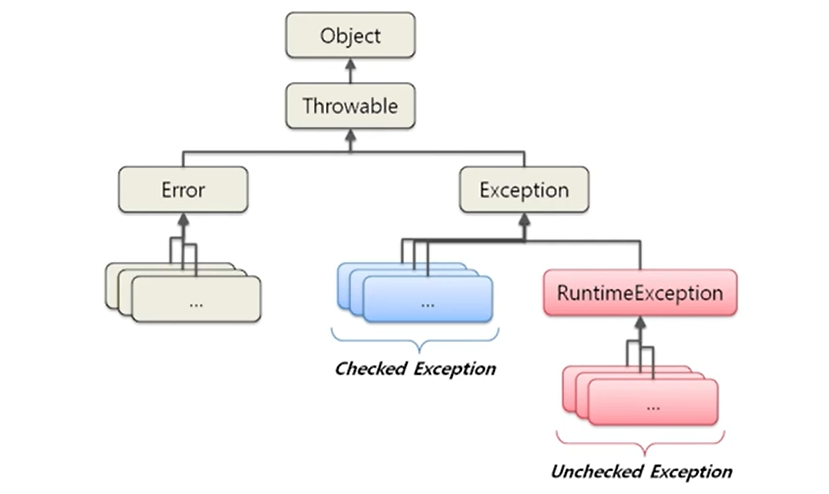
다음은 Exception 구조도 이다.

)
- Checked Exception
- Exception 을 상속하면 Checked Exception 이며 명시적인 예외처리가 필요하다.
- ex) IOException, SQLException
- Unchecked Exception
- RuntimeException(실행중일때 발생하는 에러) 을 상속하면 Unchecked Exception 이며 명시적인 예외처리가 필요하지 않다.
- ex) NullPointerException, IllegalArgumentException, IndexOutOfBoundExcption
Effective Java Exception 에 관한 규약
자바 언어 명세가 요구하는 것은 아니지만, 업계 널리 퍼진 규약으로
Error 클래스를 상속해 하위 클래스를 만드는 것은 자제하자.즉, 사용자가 직접 사용하는 unchecked throwable은 모두 RuntimeException 의 하위 클래스여야 한다.
Exception, UncheckedException, Error 를 상속하지 않는 Throwable을 만들 수도 있지만 이러한 throwable은
정상적인 사항보다 나을 것이 없으면서 API 사용자를 헷갈리게 할 뿐이므로 절대 사용하지 말자.Checked Exception 이 나쁜 이유
다음 코드의 1, 2, 3 번 방식의 단점을 다시 살펴보면
public class DeviceController { ... public void sendShutDown() { // 3번 방식 try { tryToShutDown(); } catch (DeviceShutDownError e) { logger.log(e); } } private void tryToShutDown() throws DeviceShutDownError { // 2번 방식 DeviceHandle handle = getHandle(DEV1); DeviceRecord record = retrieveDeviceRecord(handle); pauseDevice(handle); clearDeviceWorkQueue(handle); closeDevice(handle); } private DeviceHandle getHandle(DeviceId id) { ... // 1번 방식 throw new DeviceShutDownError("Invalid handle for: " + id.toString()); ... } ... }- 특정 메소드에서 checked exception 을 throw하고 상위 메소드에서 그 exception 을 catch 한다면 모든 중간 단계 메소드에 exception 을 throw 해야한다.
- OCP(개방폐쇄원칙) 위배
상위 레벨 메소드에서 하위 레벨 메소드의 디테일에 대해 알아야 하므로 OCP 원칙에 위배된다. - 필요한 경우 Checked Exception 을 사용해야하지만 일반적인 경우 득보단 실이 많다.
Unchecked Exception 을 사용하자
C#, C++, 파이썬, 루비 는 확인된 예외를 지원하지 않음에도 불구하고 안정적인 소프트웨어를 제공하는데 문제가 없다.
3. Exception 잘 쓰기
예외에 의미를 제공하라
...
    throw new DeviceShutDownError("Invalid handle for: " + id.toString());
...
오류가 발생한 원인과 위치를 찾을 수 있도록, 예외를 던질때는 전후 상황을 충분히 덧붙인다.
실패한 연산 이름과 유형 등 정보를 담아 예외를 던진다.
Exception Wrapper
LocalPort port = new LocalPort(12);
try {
    port.open();
} catch(PortDeviceFailure e) {
    reportError(e);
    logger.log(e.getMessage(), e);
} finally {
    ...
}
public class LocalPort { private ACMEPort innerPort; public LocalPort(int portNumber) { innerPort = new ACMEPort(portNumber); } public void open() { try { innerPort.open(); } catch (DeviceResponseException e) { throw new PortDeviceFailure(e); } catch (ATM1212UnlockedException e) { throw new PortDeviceFailure(e); } catch (GMXError e) { throw new PortDevviceFailure(e); } } ... }- port.open() 시 발생하는 checked exception 들을 감싸도록 port 를 가지는 LocalPort 클래스를 만든다.
- port.open() 이 던지는 모든 checked exception 들을 하나의 PortDeviceFailuere exception 으로 감싸서 던진다.
4. 실무 예외 처리 패턴
getOrElse
예외 대신 기본 값을 리턴한다.
- null 이 아닌 기본 값
- 도메인에 맞는 기본 값
Bad case
UserLevel userLevel = null;
try {
    User user = userRepository.findByUserId(userId);
    userLevel = user.getUserLevel();
} catch (UserNotFoundException e) {
    userLevel = UserLevel.BASIC;
}
Good case
UserLevel userLevel = userService.getUserLevelOrDefault(userId);public class UserService { private static final UserLevel BASIC_USER_LEVEL = UserLevel.BASIC; public UserLevel getUserLevelOrDefault(Long userId) { try { User user = userRepostory.findByUserId(userId); return user.getUserLevel(); } catch (UserNotFoundException e) { return BASIC_USER_LEVEL; } } }Good case 는 예외 처리를 데이터를 제공하는 쪽에서 처리하기 때문에 호출부 코드가 심플해진다.
코드를 읽어가며 논리 흐름이 끊기지 않으며
도메인에서 맞는 기본값을 도메인 서비스에서 관리한다.
getOrElseThrow
null 대신 기본 예외를 던진다 (기본값이 없을 경우)
Bad case
User user = userRepository.findByUserId(userId);
if (user != null) {
    // user 를 이용한 처리
}
Good case
User user = userService.getUserOrElseThrow(userId);public class UserService { private static final UserLevel BASIC_USER_LEVEL = UserLevel.BASIC; public User getUserOrElseThrow(Long userId) { User user = userRepository.findByUserId(userId); if (user == null) { throw new IlligalArgumentException("User is not found. userId = " + userId); } return user; } }데이터를 제공하는 쪽에서 null 체크를 하여, 데이터가 없는 경우 예외를 던진다.
호출부에서 매번 null 체크를 할 필요 없이 안전하게 데이터를 사용할 수 있게 된다.
호출부의 가독성이 올라간다.
파라미터의 null 값을 체크하라
- Bad case
public class MetricsCalculator {
    public double xProjection(Point p1, Point p2) {
        return (p2.x - p1.x) * 1.5;
    }
}
해당 코드는 호출부에서 null 을 넣었을때 NullPointException 발생하는 코드이다.
- Good case 1
public class MetricsCalculator {
    public double xProjection(Point p1, Point p2) {
        if (p1 == null || p2 == null) {
            throw InvalidArgumentException("Invalid argument for MetricsCalculator.xProjection");
        }
        return (p2.x - p1.x) * 1.5;
    }
}
파라미터를 확인했을 때 InvalidArgumentException unchecked exception 을 발생시킨다.
- Good case 2
public class MetricsCalculator {
    public double xProjection(Point p1, Point p2) {
        assert p1 != null : "p1 should not be null";
        assert p2 != null : "p2 should not be null";
        return (p2.x - p1.x) * 1.5;
    }
}
실무에서는 good case 2 보다는 1을 많이 사용한다.
자신만의 Exception 을 정의하라
public class MyProjectException extends RuntimeException {
    private MyErrorCode errorCode;
    private String ErrorMessage;

    public MyProjectException(MyErrorCode errorCode) {
        // ..
    }

    public MyProjectException(MyErrorCode errorCode, String errorMessage) {
        // ..
    }
}

public enum MyErrorCode {
    private String defaultErrorMessage;

    INVALID_REQUEST("잘못된 요청입니다."),
    DUPLICATED_REQUEST("기존 요청과 중복되어 처리할 수 없습니다."),
    // ..
    INTERNAL_SERVER_ERROR("처리 중 에러가 발생했습니다.");
}

// 호출부
if (request.getUserName() == null) {
    throw new MyProjectException(MyErrorCode.INVALID_REQUEST, "userId is null");
}
장점으로는 다음과 같다.
- 에러 로그에서 stacktrace 해봤을 때 우리가 발생시킨 에러라는 것을 알 수 있다.
- 다른 라이브러리에서 발생시킨 에러와 섞이지 않는다. 우리도 IlligalArgumentException 을 던지는 것보다도 자신만의 에러를 던지는 것이 어느 부분에서 에러를 발생했다고 판단하기 쉽다.
- 우리 시스템에서 발생한 에러를 나열할 수 있다.
'Java > 클린코드' 카테고리의 다른 글
[클린코드] 단위테스트 (0) 2022.04.27 [클린코드] 경계 (0) 2022.03.02 [클린코드] 객체와 자료구조 (0) 2022.02.23 [클린코드] 형식 맞추기 (0) 2022.02.15 [클린코드] 주석 (0) 2022.02.11